User Group Settings
In order to manage the below settings, you'll need to be logged in to your ACP.
Once logged in to the ACP, navigate to Members › User Group Settings to set user group access to features of your site.
Each user group has a drop-down selector of settings that control only that user group. You'll want to set each setting as you want it for every user group.
Adding User Groups
Follow these steps to add a user group. You can choose to inherit settings from another user group which can help you create similar user groups - handy when making subscriber based communities.
- Click Create User Group at the top right.

- Fill in the User Group Name.
- Choose a user group to inherit settings from. If you want to create a user group without inheriting settings, please view the User Group tutorial.
- Click Add User Group to save this user group or Cancel if you changed your mind.
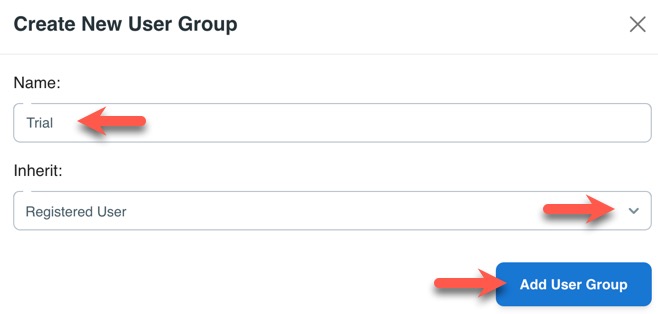
- Once save, you can either create another user group, or close the popup.
Changing User Group Settings
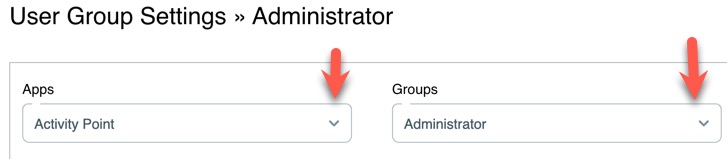
To set the settings for each feature, such as blogs, admin access, private messages, etc, choose the drop-down selector and find the settings you want to set. Each one has various options with a toggle, or input field, to set. You'll want to check the settings per user group to set them how you want them.
Special User Group Settings
Here are some user group settings that won't be found in the App settings.
Core Settings
Can view the site even when it's set to offline?
This setting allows users in this member level to log in and see the site even when you have it in offline mode. Normally, only admin is allowed on a site in offline mode as maintenance or setup is being done.
Group banned from logging into the site and interacting with other members. Note: This option is intended only for "Banned" usergroup.
This is normally only enabled for the Banned member level as it prevents members in this member level from logging in. Use caution when setting this as it will prevent your admin user from logging in if you set it for that member level. Double check the member level you are setting this for before saving it.
User Settings
Most of the settings are self-explanatory and allow you to disable changing of Email, First name, Last name, Display name. We will explain some settings below.
Can feature members?
This setting allows members to feature other members if enabled.
Can view restricted custom fields?
This setting allows members in this user group to view custom fields set as restricted. This does respect the user's privacy setting they may set when answering the custom field. This setting is useful if you have member levels that need to view restricted custom fields that other member levels cannot view, but still allows a level of privacy per the user's setting.
Can view private custom fields?
This setting allows members in this user group to view custom fields set as private by members. This is intended for Admins, Staff, and other trusted member levels that would need to see all restricted custom fields, including those set as private by the user.
When done, be sure to save the settings by clicking Save Changes at the bottom of the page.
Need help?
If you need any help, drop us a line at our Konnexu Support Portal or ask a question at the Konnexu Community. We're always happy to assist.