Managing Your Konnexu Client Account
The client account portal, or dashboard, is where you'll manage your Konnexu client account and subscriptions. The instructions below assume that you are logged in to the Konnexu client dashboard.
Editing Your Account Details
There are two ways to edit your account details.
-
In the left sidebar, click "Change" when on the main dashboard page.
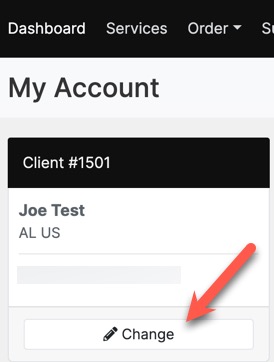
-
Alternately, in the top right user drop-down, click "Manage Account."
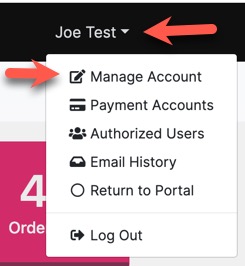
- There are some input fields that require you to submit a support ticket in order to change them. Any greyed out items require our staff to edit.
Canceling Your Account
You can cancel your account at any time. Please ensure that you also your subscription first. To cancel your account, please contact our support. Note that your membership in our Konnexu community is separate from your account. You can request cancellation of your community account, or log in there and click to delete your account.
Transferring Your Account
We don't allow account transfers. However, if you wish to sell your site, you can transfer the site to another owner by having the new owner create an account with us and subscribe to the same level, or above, of service that you have. You can then send a ticket to us to request to transfer the site to the new owner. Please also have the new owner submit a ticket requesting the transfer. We will then verify with each of you regarding the transfer and start the process. Note that any subscription discounts you may have will not transfer to the new owner.
Need help?
If you need any help, drop us a line at our Konnexu Support Portal. We're always happy to assist.