Konnexu Business Email
This services provides you with the opportunity to have your Email(s) from your own domain. You'll be able to create Email accounts for your organization, family, and friends. Business Email isn't only for businesses. This is also great for those creating a family site, specific niche, and any community you choose. If you own a domain, you can create a Business Email account.
The free business Email service that some clients receive starts with a "postmaster" admin user/Email account. This cannot be changed. We recommend following the steps for adding Email accounts to create an Email you can use.
Verify Domain and Find DNS
After the service is added to your account, you'll need to set DNS records. These can be found in your account by following the below guide.
- Click the "Manage" button to the right of your domain in the main dashboard.

- Click the left menu "DNS Records" to show the DNS Records.
- The first record will be a TXT record you need to add to your domain DNS settings at your domain registrar, or in the Konnexu
DNS manager if using Konnexu DNS.It should be something like "workspace-verification" or similar. You'll need the Name/Host and Value. Note: If you don't see a notice to verify the domain, you've already done this step. Skip to the step to add MX, CNAME, etc.
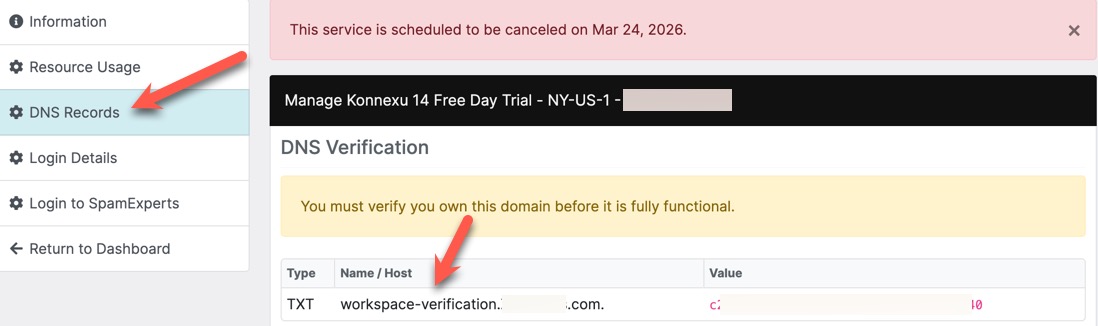
- Once you add that to your domain registrar, it will propagate based on their timeline for propagation. After propagation, which sometimes only takes a few minutes, your domain will be verified and your site will be active.
- Ensure you add the rest of the MX, CNAME and TXT records in order to have your business Email work.
- The DKIM record is especially important in order for your business Emails to work properly.
Need help?
If you need any help, drop us a line at our Konnexu Support Portal or ask a question at the Konnexu Community. We're always happy to assist.