Business Email - Importing Your Emails Into Your New Email Account
You can import your Email, contacts, calendars, tasks and notes into the Business Email service quite easily. Here’s how (for this tutorial we will use Roundcube):
- Log into webmail as a user, with your Email address and password.
-
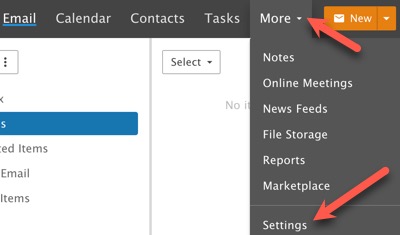
Navigate to More > Settings.
-
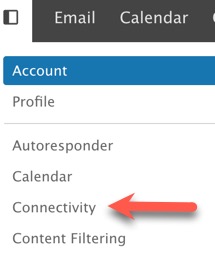
Click on Connectivity.
-
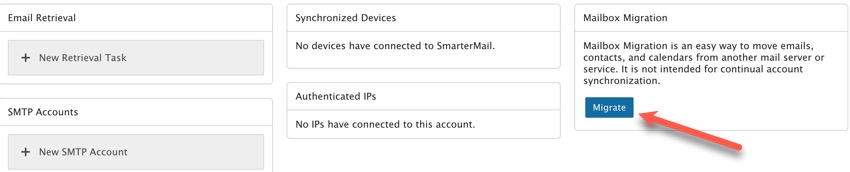
In the far right, you’ll see the Mailbox Migration box. Click the Migrate button.
-
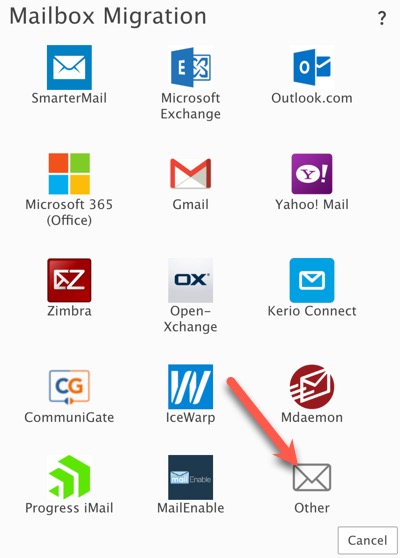
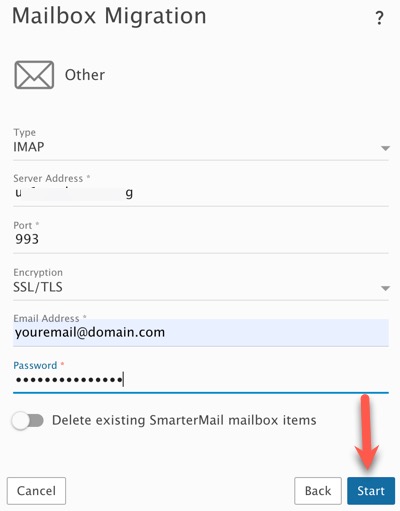
In the popup, if migrating from Roundcube, choose “Other.” If migrating from another source, please choose the appropriate one.
-
Fill in the following details you received when your Email that you are importing was set up:
- Type: This will either be POP or IMAP. The difference is that POP will pull ONLY messages from the Inbox whereas IMAP may be able to pull additional items such as calendars. We recommend IMAP and will use that for this tutorial.
- Server Address: From the Email setup information for the Email you are importing, this is the SSL server using port 993 for IMAP. If using POP, it is port 995.
- Port: The port that’s associated with the Type you’ve selected. Either 993 for IMAP or 995 for POP.
- Email Address: This is the full email address you’re migrating over. For example, jdoe@office.com
- Password: This is the password you use to log into the account you’re migrating over.
- Require SSL: This is enabled by default, requiring a secured login.
- Delete existing SmarterMail mailbox items: Enabling this will overwrite any existing SmarterMail data with the data that’s being migrated over. That includes all contacts, calendar entries, etc. If this is NOT enabled, the migrated data will be “merged” into any existing data and nothing is overwritten.
-
Click the “Start” button to start the migration. Please wait for it to finish. If you have a lot of mail to import, it could take some time.
Need help?
If you need any help, drop us a line at our Konnexu Support Portal. We're always happy to assist.