Draft Clone Editing
Konnexu has a special feature for editing content. You can create a draft edit during the edit process and while editing the draft, your original content remains untouched - still indexed by Google if it’s not a private item! This is awesome for SEO purposes and for allowing time to edit and revise while the original is still visible. Once published, the new content simply updates the original - saving the URL for SEO. Awesome stuff!
Here’s how, using Blog as an example:
- To edit your blog, when in the blog section, click the My Blogs tab at the top.

- You can filter the blogs by Scheduled, Published, or Draft. You can also sort by Recent, Most Liked, Featured, Most Comments, Alphabetically Ascending/Descending. Or, you can search for the blog you want to edit.
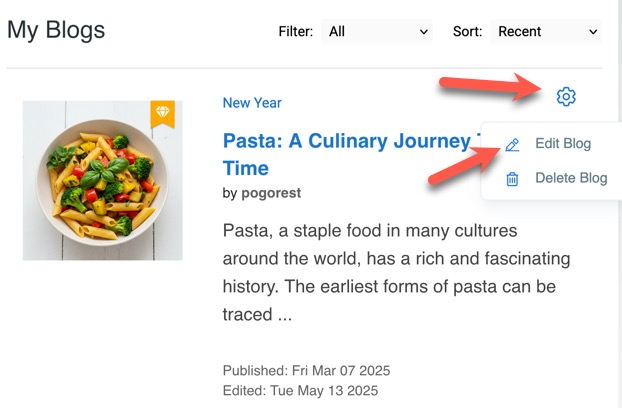
- To the right of your blog you want to edit, click the cog and choose Edit Blog.
-
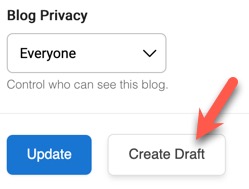
You can start editing this blog or, before you edit, you can click “Create draft” at the bottom. This will save the blog as a cloned draft of the original.
-
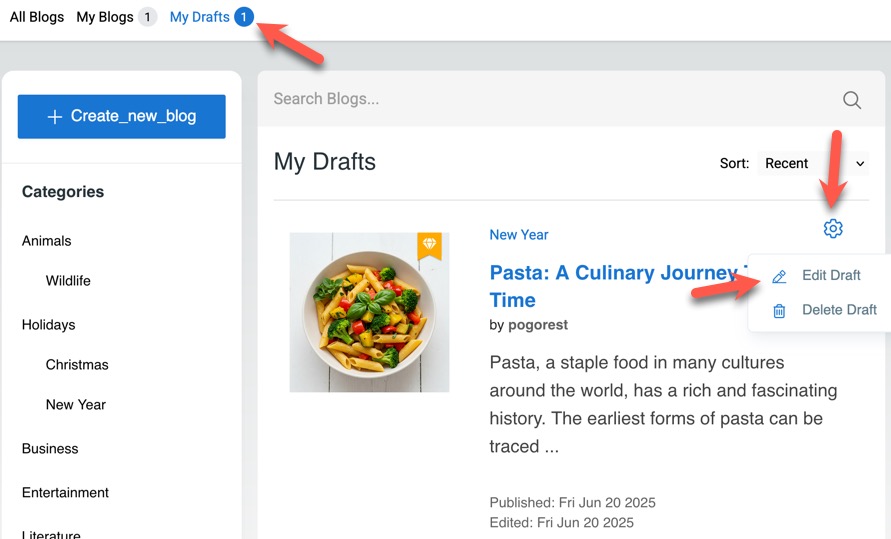
Once saved, you’ll find it in “My Drafts” and can click to edit it again.
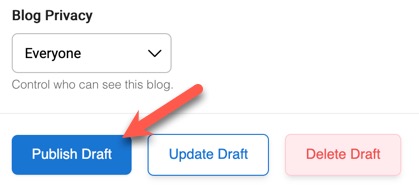
- Once done editing, click “Publish Draft” and the new content will update the original post.
Need help?
If you need any help, drop us a line at our Konnexu Support Portal or ask a question at the Konnexu Community. We're always happy to assist.