Offline Mode
The Offline mode setting allows you to set up your site in privacy, keeping bots and guests from viewing the site. In order to access your site while in offline mode, navigate to the log in page (yoursite.com/login) and you can log in normally.
Toggle the Site Online/Offline
In order to set your site offline or online, you'll need to be logged in to your ACP.
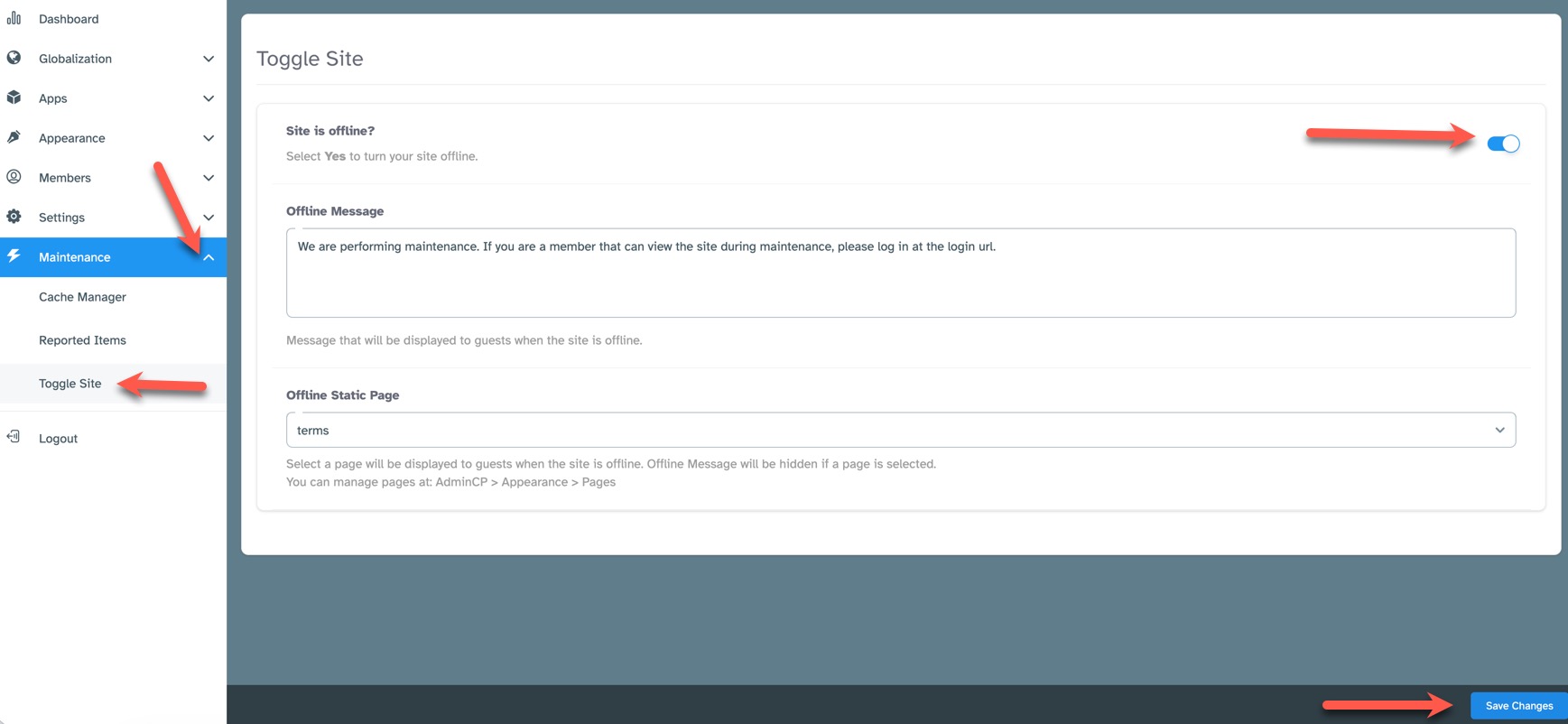
- Navigate to Maintenance > Toggle Site
- To the far right of the setting, "Site is offline?" toggle the button On (colored) to enable offline mode, or Off (greyed out) to disable offline mode.
- Click the "Save Changes" button at the bottom.
Set the Offline Message
You can set an offline message that will show when the site is in offline mode. Note that if you choose an offline static page, this message will not
show as the chosen page will show instead. We don't recommend putting a link to the log in page as bots can follow that link too.

Set an Offline Static Page
You can choose which page loads when the site is in offline mode from available pages you've created via the page manager.

Need help?
If you need any help, drop us a line at our Konnexu Support Portal. We're always happy to assist.