Site Details & Info - Konnexu Community Builder
Take your time and give thought to the settings in this tutorial. They can help you with your SEO, which is important if you need your site to do well with search engines. There are a lot of great tutorials regarding best practices for SEO. We linked one from Google in the General Website Settings page.
The redirect setting is also helpful if you want your users to land on a specific page after logging in. For example, if you want a site focused on the forum, you can set the redirect to the forum page and users will be in the forum after logging in.
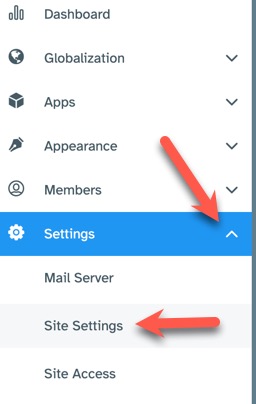
In order to set the site info settings, you'll need to be logged in to your ACP and navigate to Settings >> Site Settings.
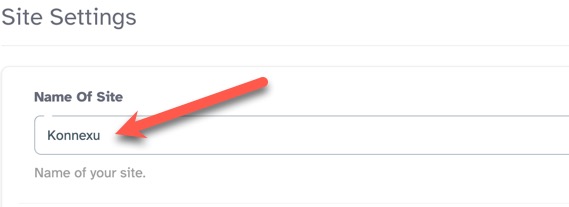
Site Name
Fill in the "Name of Site" input box with what you want to show as the Site Title. This shows in the browser tab.
Copyright
Fill in the copyright input box with either just the year or to have it auto update, you can fill in the code we show below.
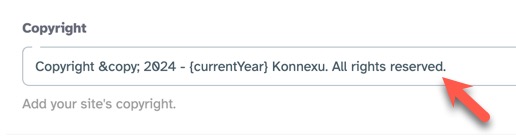
Auto-updating copyright
This example uses Konnexu. Fill in your own company name and the year you want to show as the starting year.
Copyright © 2024 - {currentYear} Konnexu. All rights reserved.
Copyright ©
Change the year but keep the dash and spacing:
2024 -
Keep the next part:
{currentYear}
Change this part:
Konnexu. All rights reserved.
So if our company is Amazing Donuts which has a starting year of 2023, we could put this:
Copyright © 2023 - {currentYear} Amazing Donuts. All rights reserved.
Copyright without auto-update
This example uses Konnexu. Fill in your own company name and the year you want to show.
Copyright © 2025 Konnexu. All rights reserved.
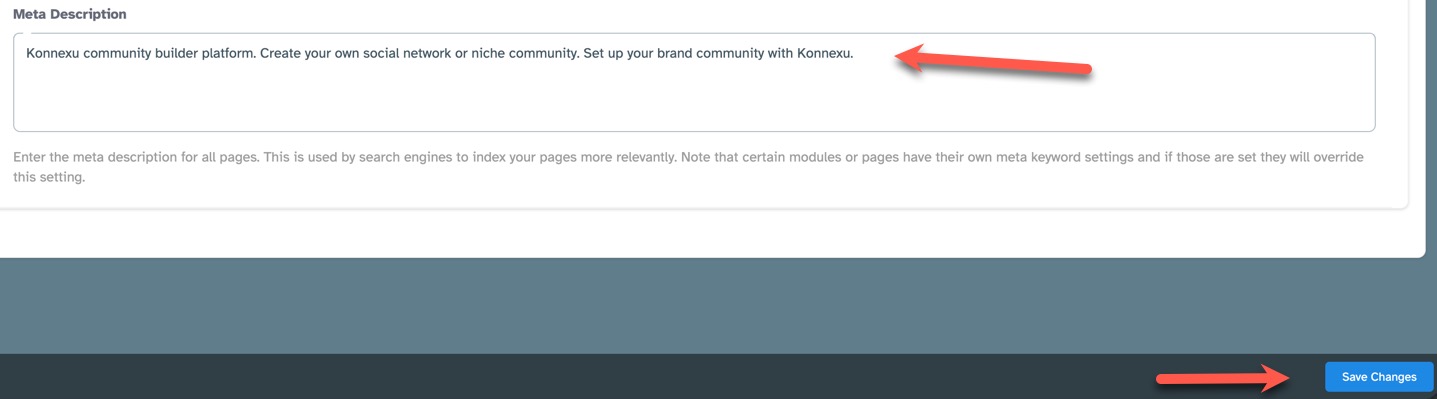
Meta Description
Enter the meta description for all pages. This is used by search engines to index your pages more relevantly. Note that certain modules
or pages have their own meta keyword settings and if those are set they will override this setting.
URL Redirect after login
After a user has logged in, and they have not requested a page to visit, you can set a default redirection URL, which will send them to this specific page right after they log in. If you add an external link be sure to add "https://" (without quotes) otherwise the URL will be treated as an internal link.
Example: If you want to redirect users to the forum after log in, you would put "/forum" or "forum" without quotes like this:

Need help?
If you need any help, drop us a line at our Konnexu Support Portal or ask a question at the Konnexu Community. We're always happy to assist.