Member Registration Settings - Konnexu Community Builder
Member Registration Settings
In order to manage the below settings, you'll need to be logged in to your ACP.
Once logged in to the ACP, navigate to Settings > Registration Settings.
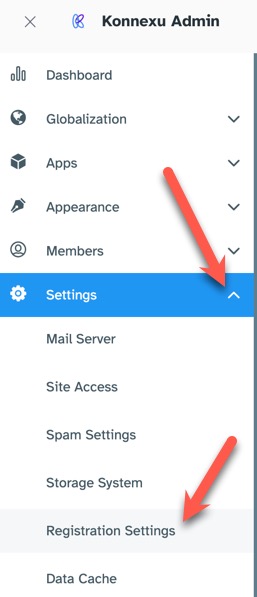
Most of the settings are self-explanatory. However, should you have questions, please feel free to contact us for assistance. We're always happy to be of help! Below are some settings that we felt may need a bit more explaining:
Display Full Name (Display Name) and Username on Sign Up
The Username is used to create a vanity URL for users (eg. http://www.site.com/username). If the Username field isn't displayed on the registration form, we will use their unique ID number to create their vanity URL. You can then enable a user group setting that can allow users to edit their username at a later time. Otherwise, if the Full Name (Display Name) field is hidden, we will use Username as Full Name (Display Name) and the user can change it when accessing the Account Settings page.
Terms & Privacy Confirmation
This setting enables the Terms and Privacy agreement for registration, which is required in most locations. We recommend you check the laws in your area if you aren't sure. Please be sure to add your Terms and Privacy policies if you enable this setting.
User Group on Registration
With this setting you can control the default user group for a user when they register. This setting will be overridden if user chooses a membership package.
Force Users to use a strong password
We strongly urge you to keep this setting enabled. This helps to protect user accounts from hacking. Nothing is 100% fool-proof, but having a stronger password these days is a must.
Need help?
If you need any help, drop us a line at our Konnexu Support Portal or ask a question at the Konnexu Community. We're always happy to assist.