Anti-Spam Settings
Website spam can make you want to run and hide. It can quickly fill your site with useless posts with backlinks to the spammer's website or sites they are promoting. Anyone who has a website that allows members, comments, posts will eventually have to deal with spamming. We've included tools in Konnexu, and some tips below, to help you deal with spam.
In order to enable captcha or other spam settings, you'll need to be logged in to your ACP.
Enabling Captcha for Registration
You can enable a basic captcha routine that will help to stop spam. We strongly recommend enabling at least a basic captcha for registration. Later, when we add more captcha options, you can choose the best one for your needs.
- Navigate to Settings >> Registration Settings.
- Click the toggle to the right of "Captcha on Registration" to enable or disable a basic captcha challenge.

- Once done, click the "Save changes" buttion in the bottom right.
Enabling Captcha for Login
You can enable a basic captcha routine for log in. However, we don't recommend using this setting as it can cause members to become frustrated as they have already joined the site and don't expect to have to validate again. We include it as some may want to have this enabled.
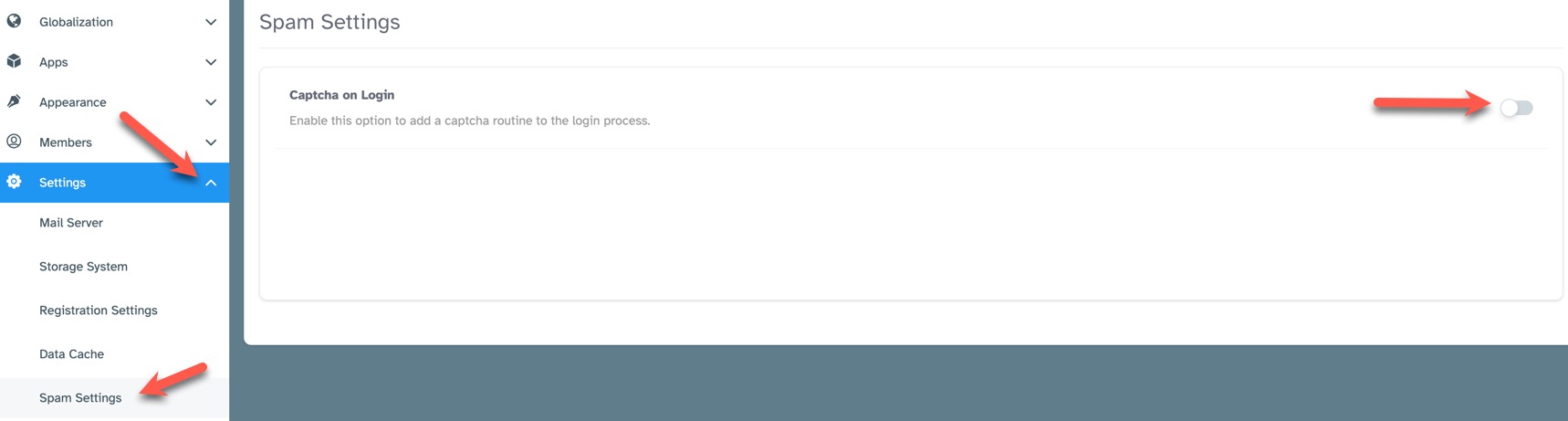
- Navigate to Settings >> Spam Settings.
- Click the toggle to the right of "Captcha on Login" to enable or disable a basic captcha challenge.
Tips to Help Reduce Spam
The best way to manage spam is to manage who you let on your site, who you let post, and what kind of posts you allow. Here are a few tips for reducing spam.
- Enable captcha for registration.
- Use member levels to control who can post. Perhaps don't let general Registered users post until they've shown they are real and not just spammers.
- With the above suggestion, set the allowed posts to require approval. For example, if you allow Registered users to post photos or blogs, have those set to require approval before they are seen by the community.
- Control which members can contact other members (spammers will spam your members if you aren't careful - this leads to losing members).
- Change default phrases to make your site unique. One tool of spammers once they know a platform's default phrases is to use spambots to search for those specific phrases in order to find sites using that platform. They then sign up in droves and add thousands of spam posts.
- Set your community to "Invite only" if you want to strictly control who joins.
We will post more help at our community. Feel free to ask questions there if you need more help controlling spam.
Need help?
If you need any help, drop us a line at our Konnexu Support Portal or ask a question at the Konnexu Community. We're always happy to assist.