Pages
The page manager allows you to create, edit and remove custom pages from your site. For example, you can create an About page and add details about your site focus, niche, business about details, etc. This is not for core or app pages, such as profile, blog, activity wall, etc.
In order to manage the below settings, you'll need to be logged in to your ACP.
Once logged in to the ACP, navigate to Appearance >> Pages.
Creating a page
- Click "Create New Page" at the top right.

- Fill in the page details:
- Page Title - this shows in the page as the header.
- URL - this is the URL of the page. Don't put the starting slash. Please view our example below.
- To the left, fill in the content of the page.
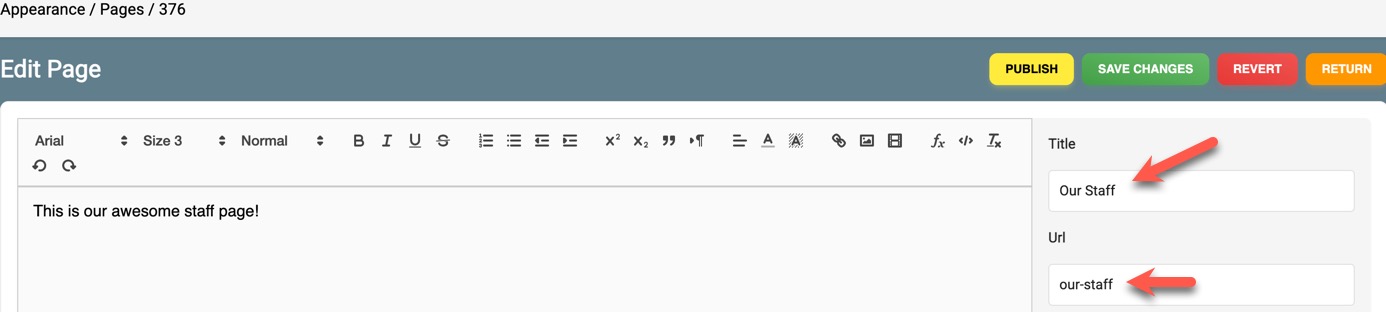
- Click "Publish" to publish the page, or click "Save Changes" to save the page without publishing it.

Deleting a Page
To delete a page, click the "Delete" button on the right.

Editing a Page
To edit a page, click the "Edit" button on the right.
 This will open the edit screen where you can change the Title, URL (be careful with this as changing the URL of published pages can impact your SEO),
and page description.
This will open the edit screen where you can change the Title, URL (be careful with this as changing the URL of published pages can impact your SEO),
and page description.
Once you start editing, you'll see more buttons at the top of the page. These are:
- Unpublish - this will put the page back in draft mode, out of public view.
- Save Changes - this will save your changes and publish them.
- Revert - this will revert the changes you made.
- Return - this exits the edit screen without saving changes.

Need help?
If you need any help, drop us a line at our Konnexu Support Portal or ask a question at the Konnexu Community. We're always happy to assist.